
KULT Elite M150
Two batteries to never weigh down the mouse
Score: 8/10
Images and videos



At a glance
We liked
- A weight of 56 grams with a full shell
- A precise and stable PixArt PAW 3950 sensor
- A maximum polling rate of 8,000 Hz wired and 2.4 GHz
- Two easy-to-replace removable batteries
We liked less
- A smooth surface that marks and can become slippery without the supplied strips
- A symmetrical shell whose side buttons favor the right hand
- Only five programmable controls
- A 1.6 meter cable sometimes short for a distant tower
 By Farrel Grimwood · published · 9 min read
Contents
Since 2016, The G-Lab has built a large part of its catalog around accessible peripherals. The French brand knows how to offer keyboards, headsets and mice at reasonable prices, but it remains less expected in the field of competitive models. With the KULT Elite M150, it moves into a different category without giving up a still reasonable price.
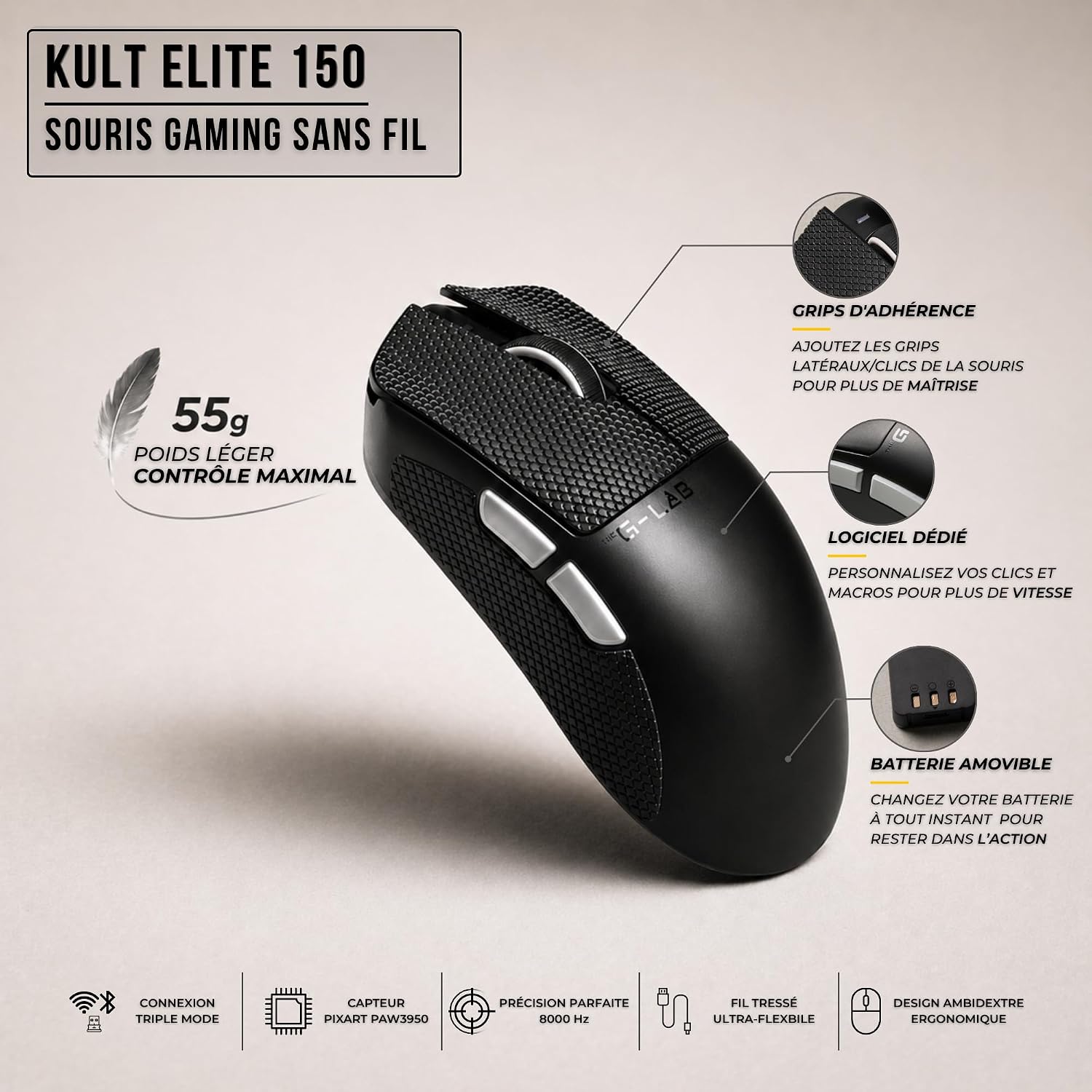
The spec sheet brings together almost all the figures that have become essential in this segment: 55 grams, PixArt PAW 3950 sensor, polling rate of 8,000 Hz, 2.4 GHz connection, Bluetooth and USB-C cable. The G-Lab especially adds two removable 400 mAh batteries, a rare solution on such a light mouse. The idea is to replace the empty cell in seconds instead of immediately plugging in the cable.
This mouse is priced at 79.99 euros, with a simple shell, five programmable controls and no RGB lighting. The price no longer places the brand at the entry level, while the sensor and frequency compete with much more expensive models. Does the KULT Elite M150 just have good specifications, or does The G-Lab finally have a mouse capable of convincing the most demanding gamers?
56 grams without a perforated shell
The G-Lab announces 55 grams. The instructions indicate 56 grams with the battery installed and 44 grams without it. In both cases, the result remains excellent for a wireless model with a full shell.
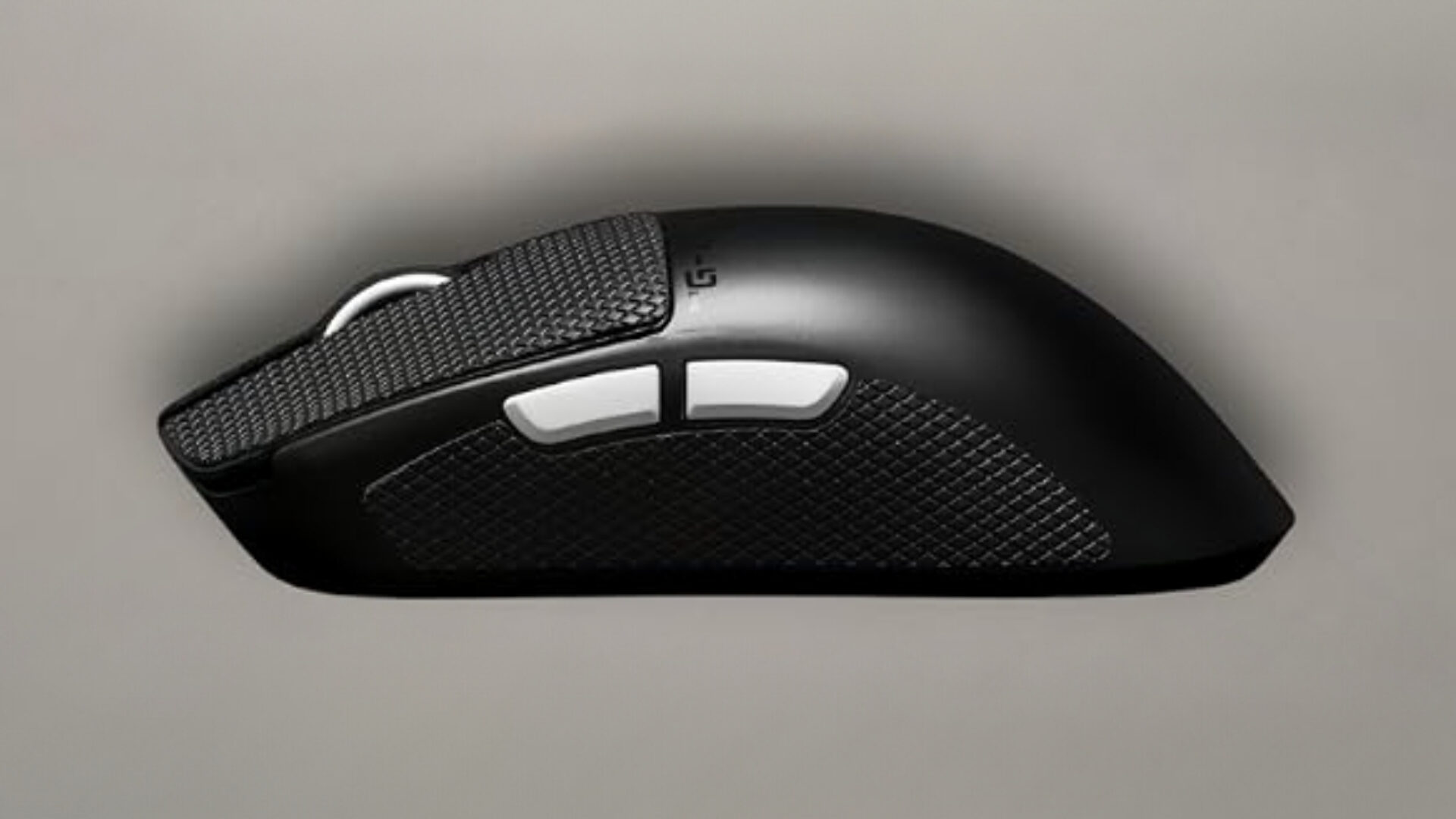
The low weight is felt immediately. The mouse requires little effort to start, stops easily and reduces fatigue during long games. PTFE pads cover enough surface area to maintain smooth gliding on a fabric mat. The shell does not twist under normal pressure and no drilling exposes the interior to dust.
The black, smooth plastic, however, seems less attractive than the electronic part. It marks quickly under the fingers and can become slippery when the hand heats up. The G-Lab provides adhesive strips for the two main buttons and the sides. They substantially improve grip, at the cost of a rougher feel and a less uniform finish. Their presence in the box is useful, but it also shows that the bare surface lacks grip.
The absence of RGB does not detract from the product. It saves energy, avoids an unnecessary luminous zone under the palm and allows you to maintain a closed shell. The very simple design will not give much personality to a desk, but this restraint at least has a clear function.
A symmetrical shape that remains designed for the right hand
The case measures 125mm long, 63mm wide and 38mm high. This medium format keeps a fairly low back and facilitates movements made with the fingers. A claw grip, with the palm partially rested and the fingers arched, matches its proportions well. A fingertip grip benefits even more from the reduced weight. A large hand placed entirely on the mouse, however, risks lacking rearward support.
The shape appears symmetrical when viewed from above, but the two side controls are only on the left side. They therefore fall under the right thumb. A left-handed person can move the pointer and use primary clicks, but loses natural access to the back and forward buttons.
Five controls can be programmed. This total covers the needs of an FPS, a strategy game or an action title, but it leaves little freedom as soon as several shortcuts must remain under the thumb. An additional control behind the wheel or a third side button would have made the model more versatile without profoundly changing its shape.
The PAW 3950 belongs to PixArt’s most ambitious optical sensors. Its resolution goes up to 30,000 DPI and it supports a maximum acceleration of 50 G. The limit of 30,000 DPI is mainly for technical demonstration. At this level, a few millimeters are enough to cross several screens and control becomes almost impossible. The interest of the 3950 lies elsewhere: its tracking remains precise at realistic settings, it tolerates rapid movements and shows no dropout or perceptible artificial correction. In games as different as Valorant, Rocket League or League of Legends, movements remain consistent.
The reduced weight complements the sensor better than the 30,000 DPI figure. Low sensitivity requires large arm movements; 56 grams then limit inertia and facilitate short stops. At high sensitivity, the lightweight shell requires a calmer hand, as the slightest involuntary movement becomes visible. The mouse therefore does not impose a style, but it rewards consistent adjustment.
The software allows you to record several levels. The initial profile notably offers 800, 1600, 2400, 3200, 6400 and 30,000 DPI. The final jump is of little interest and deserves to be replaced by a value adapted to the player. This modification only takes a few minutes, then the selection button allows you to find each level.
The polling frequency indicates how often the mouse transmits its position to the computer. At 1000 Hz, information can be sent every millisecond. At 8000 Hz, the theoretical interval drops to 0.125 milliseconds. The KULT Elite M150 reaches this frequency at 2.4 GHz as well as with the cable, which distinguishes it from many models which reserve their maximum value for wired.
Movement appears more regular on a very fast screen, especially with a frequency of 240 Hz or more and in a game where the camera rotates constantly. The gain over 1,000 Hz, however, remains much less spectacular than the ratio of one to eight might lead you to believe. On a 60 or 144 Hz screen, the difference becomes small. It can even disappear behind the latency of the game, the screen or the player.
The mode also requires more work from the processor. An old machine or one already under heavy load may lose some of the expected benefit. Finally, the game must correctly process this very high flow. The 2000 or 4000 Hz setting is often a better compromise on a newer computer, while 1000 Hz remains perfectly solid for the majority of titles.
The G-Lab therefore does not sell a fictitious frequency. The 8000 Hz works and logically complements the PAW 3950. It simply does not justify, on its own, a mouse replacement. Its cost in battery life turns out to be much easier to measure than the fractions of a millisecond saved.
Fast clicks, just five controls
The two main buttons employ TTC optical switches. Pressure cuts a light beam instead of closing a metal contact. This method limits the electrical debounce delay and reduces the risk of involuntary double clicks linked to contact wear. The G-Lab announces an endurance of 100 million activations.
The clicks are clear, fast and free of annoying flutter. Their noise remains present, as with most gaming mice; you should not expect a silent model. The rated lifespan constitutes a reassuring indicator, not a guarantee that no mechanical part will fail before that threshold.
The wheel sits on a TTC Gold encoder rated for two million rotations. Its notches allow you to change weapons or browse a list without losing position. Its central click joins the two side buttons in the software. The five programmable controls are enough to reassign essential functions, create a simple macro, or adapt the mouse for a game, but they remain the most obvious limitation of this chassis.
2.4 GHz mode should remain the main choice for gaming. The nano-receiver fits under the shell and provides access to high frequencies without cables. The connection remains stable and the sensor does not show any interruption during rapid movements. Bluetooth is better for a laptop or quiet activity because it uses less power and frees up a USB port. The 1.6 meter USB-C cable transforms the mouse into a wired model while charging the installed battery. Its length is sufficient on a laptop or a tower placed near the desk. It can become tight when the computer is on the floor, far behind the screen. The removable connector nevertheless remains preferable to a captive wire: a damaged cable can be replaced without opening the mouse.
Switching from one mode to another avoids having to multiply peripherals. 2.4 GHz favors responsiveness, Bluetooth extends the time between charges and USB-C ensures that the game continues. This versatility matters more than maximum resolution because it serves every day.
Two batteries, but not 200 hours in fast modes
The two 400 mAh cells are the most interesting idea of the product. One battery sits under the shell, while the second waits its turn. The replacement takes less than ten seconds. With two charged cells, a game is not interrupted by several hours tethered to a cable.
The sales pitch promises up to 100 hours per battery, or 200 hours total. The official manual provides significantly more modest figures: 56 hours per cell in 2.4 GHz at 1000 Hz, 18 hours at 8000 Hz and 62 hours in Bluetooth. Two batteries then represent 112, 36 or 124 hours depending on the mode. Fully charging takes approximately three hours.
A maximum figure may depend on a specific protocol, reduced frequency or sleep periods. The problem comes from the absence of a method clearly associated with the 100 hours. The detailed values in the instructions are more useful for preparing for a week of play and they show that 8,000 Hz divides endurance by more than three compared to 1,000 Hz.
The removable nature remains an excellent choice for longevity. A tired cell can theoretically be replaced without throwing out the entire mouse. This quality must, however, be accompanied by available parts. At the time of this test, no compatible batteries are sold separately on the official store and the two-year warranty excludes batteries, considered consumables.
Simple and sufficiently comprehensive software
The dedicated application brings together the expected functions without multiplying the menus. It allows you to reassign the five controls, create macros, modify the DPI levels and choose a frequency of 500, 1000, 2000, 4000 or 8000 Hz. The click response time drops to one millisecond.
The sleep time can be adjusted to conserve battery life. The lift-off distance, which determines the height at which the sensor stops tracking the mouse mat, can also be changed. A low value avoids moving the pointer when the mouse is lifted and put down. Calibration finally helps adapt the sensor to the surface.
The interface remains basic, but it is quickly understood and does not hide any major functions. The low number of controls naturally reduces the interest of macros and profiles. A more polished presentation would have better matched the Elite name, without changing the quality of the sensor or the responsiveness obtained.
The recommended price of 79.99 euros is consistent with the on-board hardware. The PAW 3950, the 8000 Hz wireless, the optical switches, the PTFE pads, the three connections and the second battery form a rare set at this level. The mouse is also around 69.99 euros from certain sellers, a price at which its ratio between weight, precision and functions becomes very solid.
Competition remains fierce. More expensive models offer a better-feeling plastic shell, a more elaborate shape, richer software or more controls. Others abandon Bluetooth and the removable battery to concentrate all the budget on the weight and the sensor. The G-Lab chooses a versatile path, with competitive technology in a shell still marked by the habits of an accessible brand.
A player equipped with a 144 Hz screen and satisfied with 1000 Hz should not buy this model just for the figure 8000. He will benefit more from the 56 grams, the glide and the double set of batteries. A person looking for eight or ten buttons will have to look elsewhere. For an FPS, a MOBA or a light mouse capable of also following a laptop via Bluetooth, the price remains convincing.
Verdict
An excellent foundation for competitive play, with battery life to clarify
8/10
The KULT Elite M150 gives The G-Lab a real place among ambitious lightweight mice. Its PAW 3950 follows rapid movements with precision, its 56 grams facilitate large movements and the 8000 Hz mode also works without a cable. The optical clicks are crisp, the glide is smooth and the three connections cover both gaming and working on a laptop.
At 79.99 euros, the mouse remains competitive. Around 69.99 euros, it even becomes very easy to recommend to a right-handed person who wants to reduce weight without giving up Bluetooth or fast wireless. The G-Lab has an excellent foundation; It needs a grippier surface, a few more controls and a clear replacement battery policy to match the leading models.
Pros
- A weight of 56 grams with a full shell
- A precise and stable PixArt PAW 3950 sensor
- A maximum polling rate of 8,000 Hz wired and 2.4 GHz
- Two easy-to-replace removable batteries
- Three connections adapted to different needs
- Crisp, fast TTC optical switches
- PTFE skates which ensure consistent gliding
- Clear software with DPI, frequency, macros, sleep and calibration
- A lower price than models with comparable equipment
Cons
- A smooth surface that marks and can become slippery without the supplied strips
- A symmetrical shell whose side buttons favor the right hand
- Only five programmable controls
- A 1.6 meter cable sometimes short for a distant tower
- Battery life at 8,000 Hz limited to 18 hours per battery
- A promise of 200 hours which does not correspond to the detailed values in the instructions
- No replacement batteries sold separately by the brand at the time of testing